Rategenie Help Center Rategenie Help Center
  • Overview
    • Reset My Rategenie Password
    • Managing and Adding Users in Rategenie
    • Multi-Language Support for Rategenie
    • Rategenie Setup Checklist
    • Change My Rategenie Password
  • Listings
    • Push Rates: How to manually push rates to your channel listing
    • Connect to Airbnb through Rategenie
    • Listings Overview
    • Import Bookings: How to import listing availability into your rental calendar
  • Rates
    • Length Of Stay (LOS) Discounts: How to get guests to book longer stays
    • Rental Settings: How to update rental details
    • Cost Estimator: How to preview the cost of a booking
    • Manual Rates: How to set nightly rates manually
    • Rate Mappings: How to configure channel rate pushes
    • Market Base Rate Recommendation: How to choose a base rate for specific rentals
    • Calendar Options: How to make changes directly from the calendar
    • Rental Rate Settings: How to customize rates for specific rentals
    • Export Rates: How to download rates to an external device
    • Rategenie Rates Overview
    • Rate Breakdown: How to understand your rental rates
    • Market Data: How to choose a price percentile for specific rentals
  • Hold Events
    • Hold Events Overview
    • Hold events: How to export hold events from Rategenie
    • Hold Events: How to manually block calendar dates
  • Integrations
    • Rategenie Integration with Channex
    • Rategenie Integration with Uplisting
    • Rategenie Integration with Cloudbeds
    • Rategenie Integration with Lodgify
    • Rategenie Integration with Zeevou
    • Rategenie Integration with Beds24
    • Apaleo Integration with Rategenie
    • Rategenie Integration with Hospitable
    • Rategenie Integration with Stays.net
    • Hostex Integration with Rategenie
    • Rategenie Integration with Booking automation
    • Rategenie Integration with FantasticStay
    • Rategenie Integration with OwnerRez
    • Rentalwise Integration with Rategenie
    • Rategenie Integration with HotelAvailabilities
  • Rentals
    • Download Rentals: How to export rentals from Rategenie
    • Add Rental: How to add rentals to your Rategenie account
    • Enable/Disable Rategenie rates for your Rentals through "Managed" toggle
    • Rentals Overview
  • Strategies
    • Date Specific Rule: How to set promotional rates for special dates
    • Copy Rule: How to copy rules from other strategies in your account
    • Last Minute Adjustment Rule: How to increase your occupancy for upcoming dates
    • Day Specific Rule: How to set special rates for certain days of the week
    • Channel Adjustment Rule: How to set different rates on different channels
    • Special Events Rule: How to automatically adjust pricing for events near my rental
    • Gap Night Adjustment Rule: How to increase occupancy for nights between bookings
    • Change With Occupied Bedroom Count: How to set your rates according to bedroom occupancy
    • Month Adjustment Rule: How to set different rates for different months of the year
    • Booking Restriction Rule: How to automatically apply Booking restrictions for Booking.com
    • Genie Strategy (old): How to let Rategenie set your nightly rates
    • Weather Adjustment Rule: How to set rates based on the weather forecast
    • Advanced Booking Adjustment Rule: How to increase occupancy for future dates
    • Minimum Nights Rule: How to specify a different length of stay on certain days of the week
    • Genie Strategy: How to let Rategenie set your nightly rates
    • Currency Adjustment Rule: How to push different currencies to different channels
    • Seasonal Adjustment Rule: How to set rates and min night stays for certain seasons each year
    • Additional Guest Rule: How to charge for extra guests on a booking
    • Other Strategy: How to customize your rates using different strategies
    • Strategies Overview
Listings / Listings Overview /
Website Login

Listings Overview

Listings in Rategenie allow you to see all of the relevant connection details for each connected channel listing. They also allow a finer level of synchronization control.

Rategenie channel listings let you see clearly which channel rate category is having rates pushed to it. Synchronization can be turned on or off for each listing, providing you with the highest level of granularity when it comes to synchronization control.

Listings Page

  • Navigate to Listings page.

Here you can see all of your connected channels, as well as which channel rate category is currently selected to have rates pushed to it. Filter by rentals, channels or connection status.

Move your mouse over the different rows to see the property ID and room ID for each listing.
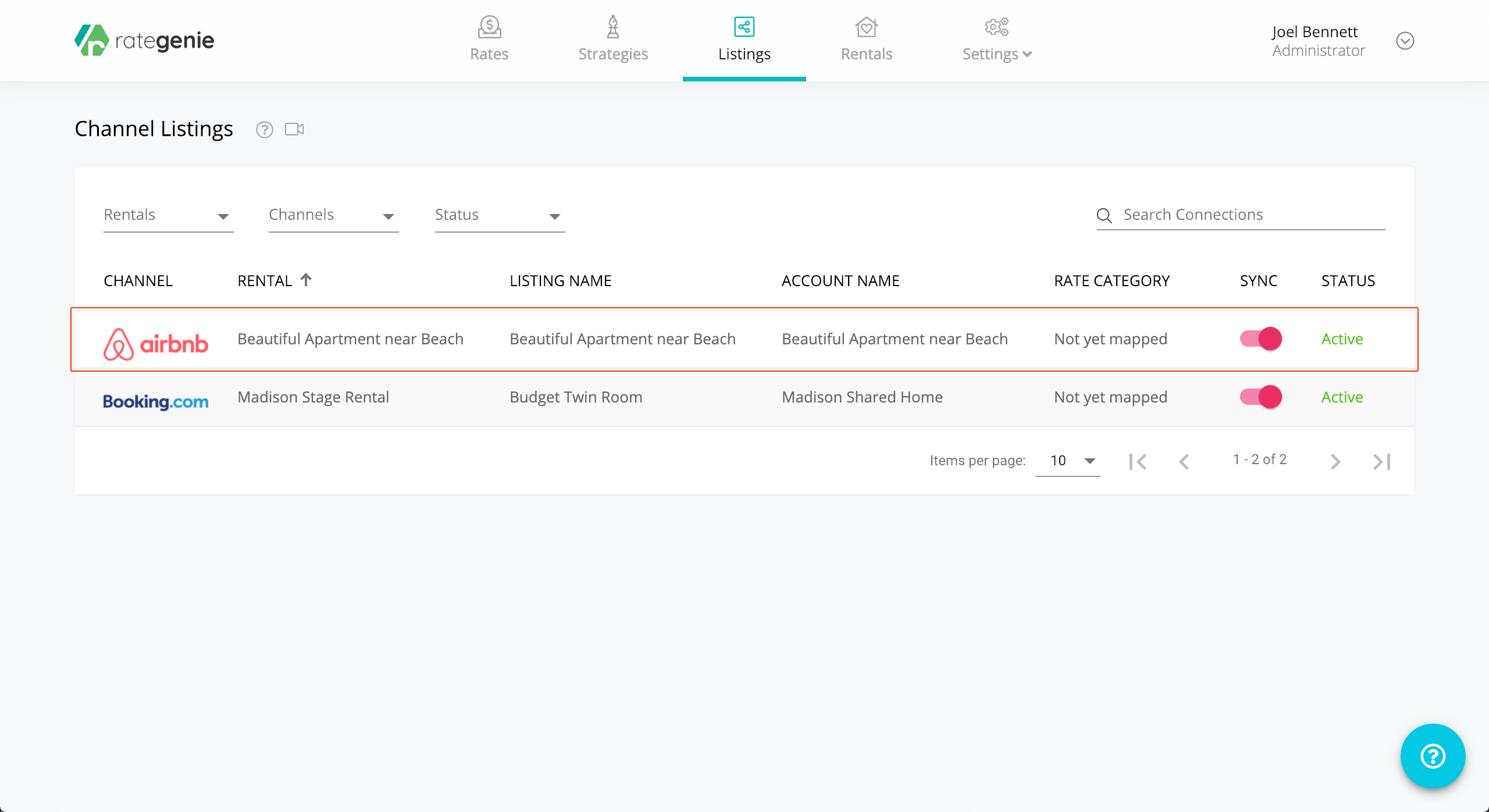
To learn more about adding new channel listings, please see the How to add a new channel listing article.

Listing Overlay

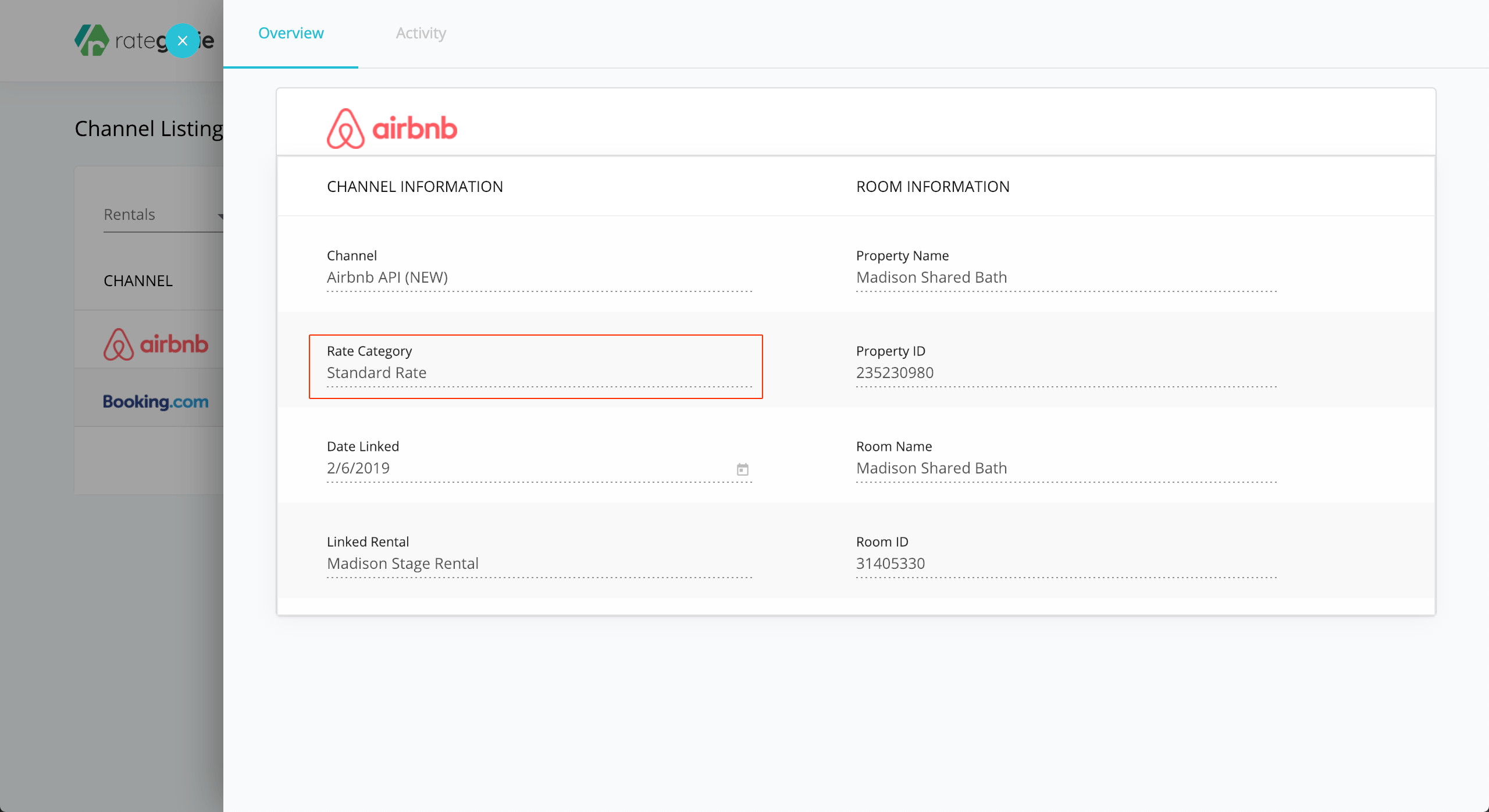
  • Click on a channel listing to open the Listing Overlay.

Rategenie > Listings Page > Listing Overlay > Overview

Here you can view the various listing details, including the property name on the channel, as well as the channel Rate Category that is selected to have rates pushed to it.
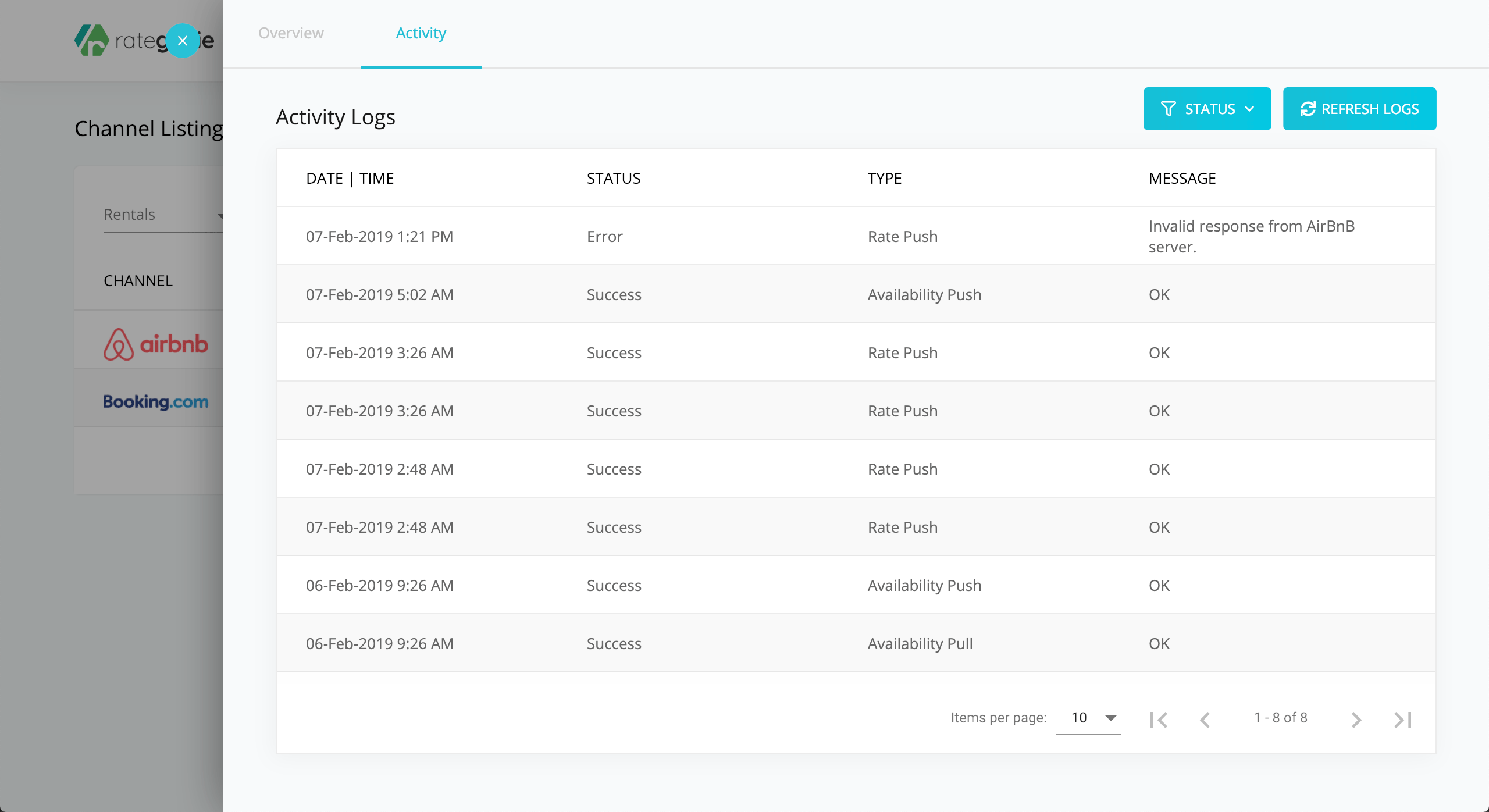
Rategenie > Listings Page > Listing Overlay > Activity
  • Click on the Activity tab to view the channel activity logs. You can see the recent activity for your channel connection. Clicking on an activity log entry will open the log details, showing the details of the data transfer.
Sync Color Codes

You may have noticed some colorful bars to the left of each of your listing entries:
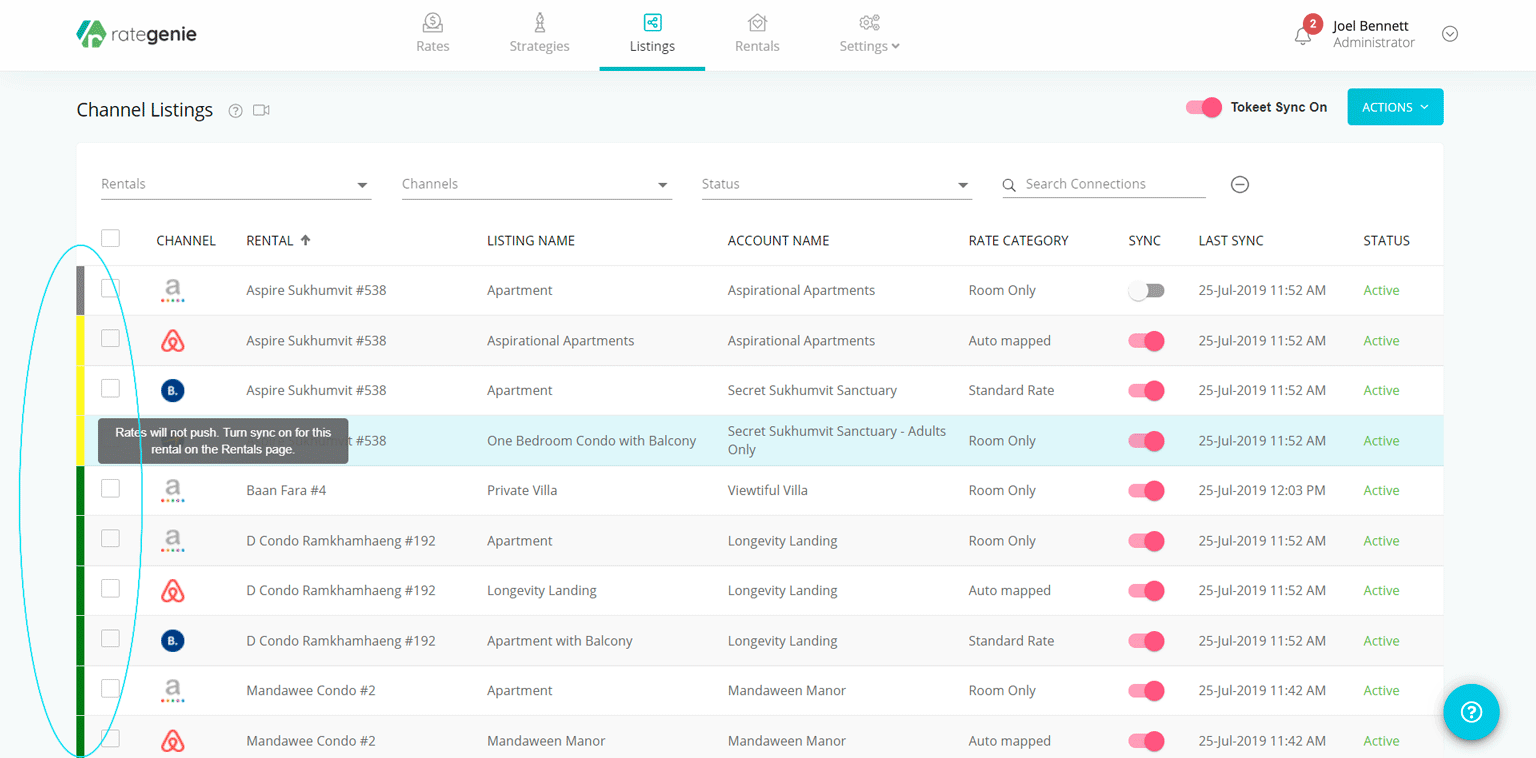
These bars let you know what each listing's sync status is - rolling your mouse over the bars will reveal a tooltip with more detailed information. Each code takes into account the three levels of synchronization: account level, rental level, and listing level. Here's a quick color code key to remember:

  • Green: Account, Rental, Listing sync ON

  • Yellow: Account, Listing sync ON / Rental sync OFF

  • Orange: Rental, Listing sync ON / Account sync OFF

  • Red: Listing sync ON / Account, Rental sync OFF

  • Grey: Listing sync OFF (other sync statuses are irrelevant)

As always, please contact us with questions any time. We're happy to help.
How did we do? Thank you! We appreciate your feedback.
Website Login
Copyright © 2025 rategenie.io. All Rights Reserved.
No documents match your search.
Searching...
